How Does the Online Font Generator Work? Complete Technical Guide
Our free cute font changer tool is engineered to instantly transform any plain text block into hundreds of custom typography styles ready to stand out online. When you type words into the input bar, the script doesn't modify your operating system's internal standard fonts (like Arial, Calibri, or Times New Roman). Instead, it performs an advanced algorithmic mapping that translates each standard letter into unique special symbols defined in the universal Unicode standard.
Thanks to this technical aspect of modern computer science, the outputs you get are not external font files (such as .TTF or .OTF formats), but real, processable text characters. This grants you a major advantage: the ability to use the native copy and paste function on any modern device to move your new text designs to social media networks, competitive gaming platforms, or mobile apps without worrying about the design breaking or losing its original aesthetic format.
Dictionary of Available Font Styles to Generate
Our symbol database features over 100 individual graphic variations. Below, we break down the aesthetic traits of the most requested fantasy alphabets by our users to create decorative text:
Each of these variations serves a distinct strategic purpose. For instance, gothic letters add a classic, raw, and historical atmosphere to usernames, while bubble fonts or kawaii styles inject a playful, friendly, and cute personality perfect for aesthetic niches. On the other hand, bold text, cursive variations, and italic or elegant formats are ideal assets for professional copy where key information needs to be prioritized.
Step-by-Step Guide to Maximize Your Use of the Tool
Step 1 - Enter your text or phrase into the control input box
Type or paste the keyword, post title, or username (Nick) that you wish to transform inside the interactive generator field at the top.
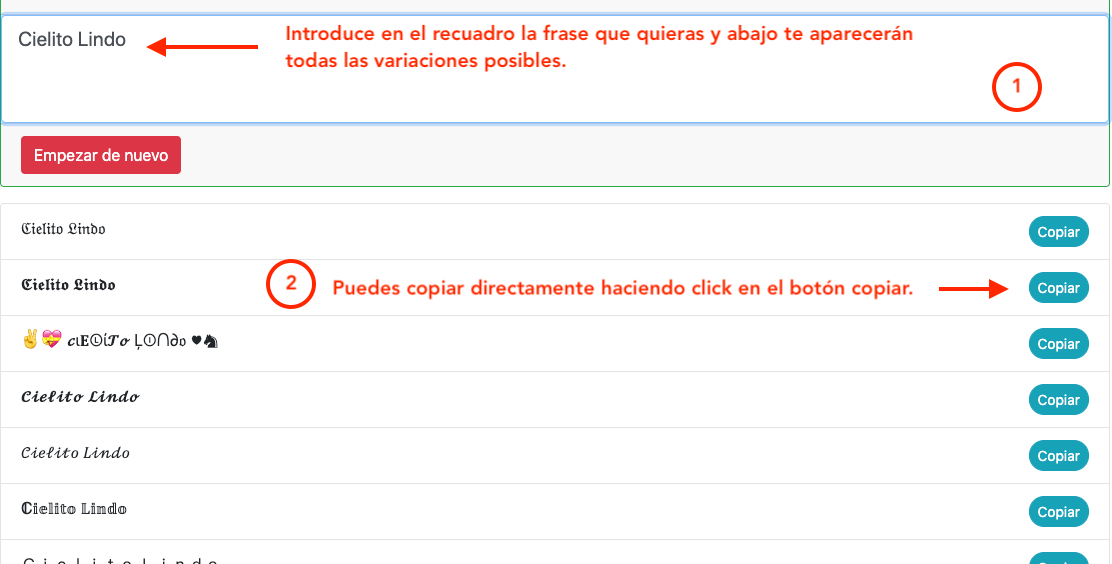
Step 2 - Browse the Results and Copy with One Click
The tool will process the alphabet within milliseconds. You will see an extensive catalog sorted vertically. Once you find the desired style—such as small text, tattoo-style fonts, or special numbers—simply click or tap the text box to copy it automatically to your system clipboard.
Step 3 - Execute the Paste Action at Your Destination
Head over to your social media network or game, press and hold the input area on mobile devices, or use the physical Ctrl+V command on desktop computers to see the instant aesthetic change.

Technical Limits and Copy-Paste Compatibility
Even though the converter is compatible with 99% of modern digital devices, there are rare occasions where you might see empty rectangles or question marks (?) instead of the modified letters. This happens exclusively if the recipient's system or device is running an outdated version that lacks built-in support for the extended Unicode character blocks. If you notice severe bugs in a specific style like calligraphy or bold letters, feel free to reach out to our team at: contacto@fuentesdeletras.net.
Font Optimization by Platforms and Applications
Beautiful Fonts for Instagram (Bios, Reels, and Stories)
In the landscape of visual marketing, your Instagram bio acts as your digital business card to the world. Stand out instantly from your competitors by implementing clean combinations of cursive letters, structured elegant fonts, or the classic bold formatting to organize your professional milestones or core contact info.
Likewise, implementing these decorative text designs within the very first lines of your traditional post captions, comments, or texts embedded in Stories will substantially boost user retention metrics, driving an organic lift in the engagement rates analyzed by the current social media algorithm.


Cool Fonts for TikTok and Video Descriptions
Within fast-paced consumption ecosystems like TikTok, catching the viewer's eye within the first three seconds determines whether your content goes viral or gets skipped. Using our graffiti letters or heavy, thick text styles within your primary descriptions helps break the standard scrolling pattern.
Take advantage of our text symbols to design interactive titles on your video covers or to structure an aesthetic profile name, ensuring users recognize your personal brand immediately when visiting your feed.
Special Fonts for WhatsApp Statuses and Messages
While WhatsApp offers very limited native editing features (like adding asterisks for basic bolding), our catalog expands your creative capabilities infinitely. Drive your sales campaigns over chat or customize your groups by sending structured alerts with fine calligraphy or bubble font designs.
Additionally, if you manage brand communication on WhatsApp Business, employing special numbers or clean lists with organized custom typography will grant a polished, corporate, and unmistakable look to your quotes or customer care responses.

Letter Styles to Make Facebook Posts and Copy Stand Out
The traditional Facebook feed suffers from massive plain text saturation that tires the casual reader. By refining your ad copy or group posts with gothic, italic, or decorative typographic variations, you manage to capture valuable clicks that were previously lost due to a lack of visual appeal.
We suggest strategically alternating target keywords in bold fonts with short sections in italics to guide the user's eye towards your main Call to Action (CTA), boosting conversions and the overall reach of your posts.

Creative Text Formats for Discord Channels
Managing and designing Discord servers requires impeccable layout structures to retain community members. Our generator supports you by providing small letters and technical symbols perfect for naming text or voice channel categories.
This allows for the creation of clean user interfaces for server rules sections, self-assignable roles, and automated bot logs. Furthermore, it lets your users personalize their own nicknames with subtle touches of elegant or gothic fonts to set clear hierarchies across community chats.
Nick Generator with Cool Fonts for Free Fire and Mobile Games
In the competitive mobile gaming scene like Free Fire, your nickname or ID represents your persona, your guild, and your skill bracket. Setting a generic name will get lost in match lobbies. By using our specialized **Nick symbols engine**, you can come up with highly sought-after combinations known in the community as "insane fonts".
Blend tattoo-style typography with graffiti alphabets, add tiny superscript numbers to showcase your esports team tags, or insert decorative symbols to build an intimidating profile that shines on the Battle Royale victory screen.

Cool fonts and pretty letters to copy and paste
At Font Generator you'll find a converter with dozens of cool fonts and letter styles for every taste: elegant cursives, bold gothics, fun bubbles, weird text and much more. Type once and copy your text in any style you want, free and with nothing to install. And if you're after something specific, we have dedicated pages for nicknames, graffiti and tattoos.
Letter styles you can create
With the generator you can turn your text into many different styles. Here are some of the most popular ones, with an example of each:
- Cursive: 𝓐𝓫𝓬 123
- Bold: 𝐀𝐛𝐜 𝟏𝟐𝟑
- Italic: 𝐴𝑏𝑐 123
- Bubble: Ⓐⓑⓒ ①②③
- Gothic: 𝔄𝔟𝔠 123
- Wide (vaporwave): Abc 123
- Underline: A̲b̲c̲ 1̲2̲3̲
- Squared: 🅰🅱🅲 123
You also have dedicated tools for some styles: Small Caps, Strikethrough Text, Reverse Text, Glitch Text (Zalgo).